
 Buy now/From $180
We first reported about PCIe 5.0 SSDs way back in January of 2022. Now, we’re finally starting to see some hit the market. While MSI, CORSAIR, and GIGABYTE have all already released their PCIe 5.0 NVMe SSDs, so far, they’ve been topping out at only around 10,000MB/s. Yes, we say “only” here because Crucial is taking things up a notch with the launch of its T700 PCIe 5.0 NVMe SSD. Crucial claims that this is the “world’s fastest” SSD, and while we haven’t tested the aforementioned drives, we have spent the past few weeks with the T700 and…the company’s claims are true. With transfer speeds hitting upward of 12,400MB/s, the Crucial T700 has the ability to move a 12GB file in under a second. Let that sink in for 12GB…I mean a second. Not sold yet? Head below for our full review where we compare the drive to other industry-leading SSDs on the market for a true benchmark of how fast it is.
Crucial’s T700 NVMe SSD is fast…like really fast
I remember the days when we went from platter drives to SSDs and transfer speeds multiplied by 10 fold. I also remember thinking that we wouldn’t get much faster than that. Oh how wrong I was. In came PCIe 3.0 NVMe drives with speeds of up to 4,000MB/s, nearly 10 times that of a SATA drive. Then, PCIe 4.0 drives with speeds of up to 7,000MB/s. Then…last year we got the announcement of PCIe 5.0 drives with “up to 13,000MB/s speeds” and I was honestly a little taken back, as well as skeptical. However, now that I’ve used a PCIe 5.0 NVMe SSD…I’m a believer.

Crucial’s T700 NVMe SSD claims to be the “world’s fastest” SSD and comparing it to other consumer drives on the market, the claim holds up. There are three other options to choose from right now on Newegg, with MSI, CORSAIR, and GIGABYTE taking center stage there. Those drives, however, have a max transfer speed of 10,000MB/s, 9,500MB/s, and 10,000MB/s respectively. Sure, this is blazing fast and likely more than any consumer, gamer, or even prosumer will ever need. However, Crucial didn’t want to be outdone, and made the T700 with transfer speeds of up to 12,400MB/s, and our testing shows that to be true. We didn’t test a bare drive either. The 2TB drive we received from Crucial was loaded up with nearly 300GB of games (around 15% utilization, which would be typical for most data or OS drives), and with CrystalDiskMark it benched quite fast. In fact, it was only ~11MB/s shy of the 12,400 mark, coming in with a (rounded) score of 12,392MB/s read, and 11,812MB/s write. Which, that write speed actually beats the 11,800MB/s mark that Crucial rates the drive for by an additional 12MB/s.
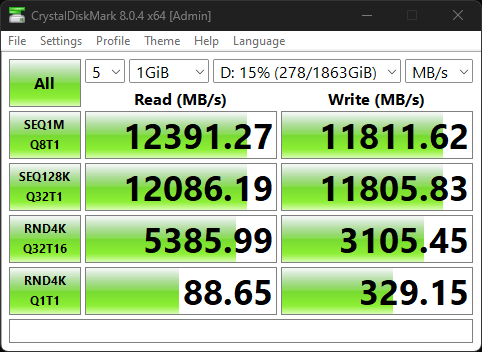
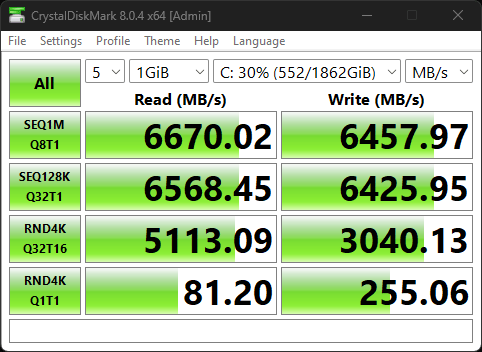
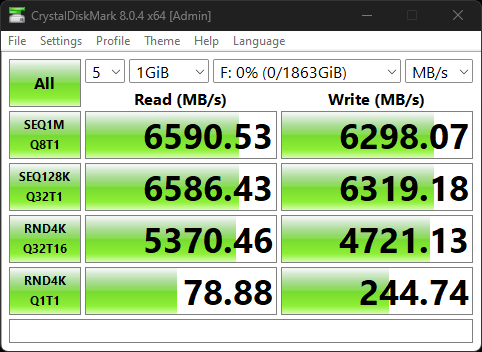
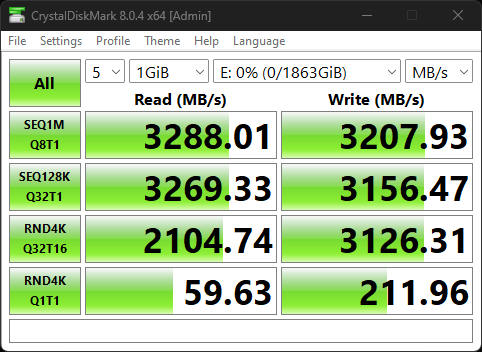
We also tested the T700 in a PCIe 4.0 M.2 slot just to see what it would achieve if you wanted to pick one up before upgrading to a new motherboard, and it was pretty great, though not the fastest. While traditional PCIe 4.0 NVMe drives are rated to top out at 7,300MB/s with the WD_BLACK SN850X, our SK hynix P41 hit speeds of up to 6,474MB/s in our testing, while the T700 in a PCIe 4.0 slot topped out at 6,670MB/s. Now, that’s nothing to shake a stick at, but at the same time, it’s not quite fully saturating that slot. There could be a number of factors for this, but it’s something to keep in mind. Then, just for posterity, we tested the SK hynix P31, and it moved data at 3,288MB/s. Just over 3GB/s, which isn’t slow in the least, but when you compare that to the T700 moving data at a staggering 12,388MB/s…it’s no comparison.
One thing you do need to be aware of is the heat generated here. Crucial’s T700 NVMe SSDs are moving data at break-neck speeds, and that generates a lot of heat. My primary drive is actually under an active cooler that came with the ASRock X670E Taichi motherboard, to ensure that it stays cool. The T700 I have in a PCIe 4.0 slot has a passive cooler on it and sits in the pathway of my desktop’s intake fans, which helps to keep it cool as well. These drives will rely on staying cool for remaining at peak performance throughout a data transfer as well as for proper drive longevity. So, just keep that in mind when choosing a drive with or without a heatsink based on whether or not your motherboard has ample cooling for it.
Crucial T700 PCIe 5.0 NVMe SSD Specs:
- Comes with or without an included heatsink
- Micron 232-layer 3D TLC NAND
- PCIe 5.0 & NVMe 2.0
- Sequential reads/writes up to 12,400/11,800MB/s
- Random reads/writes up to 1.5M IOPS
- 1TB, 2TB, and 4TB capacities
- 1GB LPDDR4 DRAM per 1TB of NAND flash
- Microsoft DirectStorage optimized
- 5-year warranty
- Dynamic SLC caching
- TRIM/SMART support
- ECC
Does all that speed actually make a difference?
We wanted to see if going from a 3,300MB/s drive up to a 12,400MB/s drive actually made any difference in the real world. While we don’t have any 4K RAW or 8K editing workflows set up for testing, that’s also not the most realistic simulation of performance for the average user. Instead, we benchmarked Forza Horizon 5 on all four drives in our system: T700 in a PCIe 5.0 lane, T700 in a PCIe 4.0 lane, P41 in a PCIe 4.0 lane, and P31 in a PCIe 4.0 lane. And…the results were both surprising and not at the same time. We benchmarked in our Ryzen 9 7900X system with 32GB of DDR5 RAM and the RX 6750 XT graphics card at 1440p on extreme settings.
Each benchmark run resulted in identical performance. All drives got 103 FPS average in the Forza Horizon 5 benchmark, regardless of generation. Everything from the P31 PCIe 3.0 drive to the T700 PCIe 5.0 drive got 103 FPS average. However, that’s only one test. Now, that doesn’t mean that the T700 isn’t faster than the P31. It’s much faster. About four times faster, in fact. However, in certain workloads, like 1440p gaming, it just doesn’t make that much of a difference. Now, if you start to crank that up to 4K or 8K gaming, your storage speed will matter a lot more. And, if you also do graphics work on 4K, 6K, 8K, or even 12K video footage, then storage speed will matter a lot to you. While we didn’t have a chance to get through all of those workloads for this review, that’s something we’re going to be working on in the future now that we have PCIe 5.0 drive on hand to test with so we can really help you make the best decision when it comes to choosing storage for your system.
Crucial doesn’t price itself out of the competition
Now, for the question that I’m sure you’ve all been asking: what’s the price. Honestly, for the speed, I don’t find it too crazy. The 1TB Crucial T700 without a heatsink comes in at $179.99, while adding the heatsink adds an additional $30. The 2TB model comes in at $339.99/$369.99, and the 4TB variant is $599.99/$629.99. This is right in line with other drive pricing, as MSI comes in a little higher at $350 for 2TB, while CORSAIR costs $170 for 1TB, and GIGABYTE will run $290 for the 2TB model. However, do keep in mind that all the other versions we just mentioned are at least 2,400MB/s slower than the T700.
gadgetnewsonline’ Take
Honestly, I’m blown away by the performance that this drive has. It’s quite insane. Being able to move a 12GB file in under a second is quite literally mind blowing. This means that with ample cooling, you could theoretically move 100GB of files in 10 seconds, or 1TB of files in under two minutes. Now, in practice, that’s not as likely to happen as there are so many other bottlenecks at play here. But, the though that you could theoretically move 1TB of files in under two minutes is something that I honestly didn’t expect to see nearly this soon.
But, it all comes down to real-world performance. And, for most people, I think a drive of this caliber just won’t be beneficial. It’s actually pretty great in pricing, all things considered, but you could get a PCIe 4.0 or even PCIe 3.0 drive and still get stellar performance on your desktop at a fraction of the cost.
However, if you’re constantly running into storage bottlenecks for high-end workflows that requite fast read and write speeds, then this is the drive for you. Crucial’s T700 is faster than any other consumer-available NVMe SSD on the market and blows the competition out of the water. The difference between Crucial and its next-closest competitor is nearly the speed of a PCIe 3.0 NVMe drive, and that’s saying a lot. So, if you need the most power possible to run your workstation on, then look no further than Crucial’s T700 NVMe SSD.


FTC: We use income earning auto affiliate links. More.




Comments